A ten-second checkSteady means generatingBlinking means standbySend us a photoA ten-second checkSteady means generatingBlinking means standbySend us a photo
10 secThat is all it takesOne look at the front panel tells you whether your system is generating.
A photoFastest way to get helpSend us a photo of the lights. It helps our team fix things faster.
Never open itSafety firstEven with the lights off, parts inside the inverter can still be live.
Huawei SUN2000Three lights
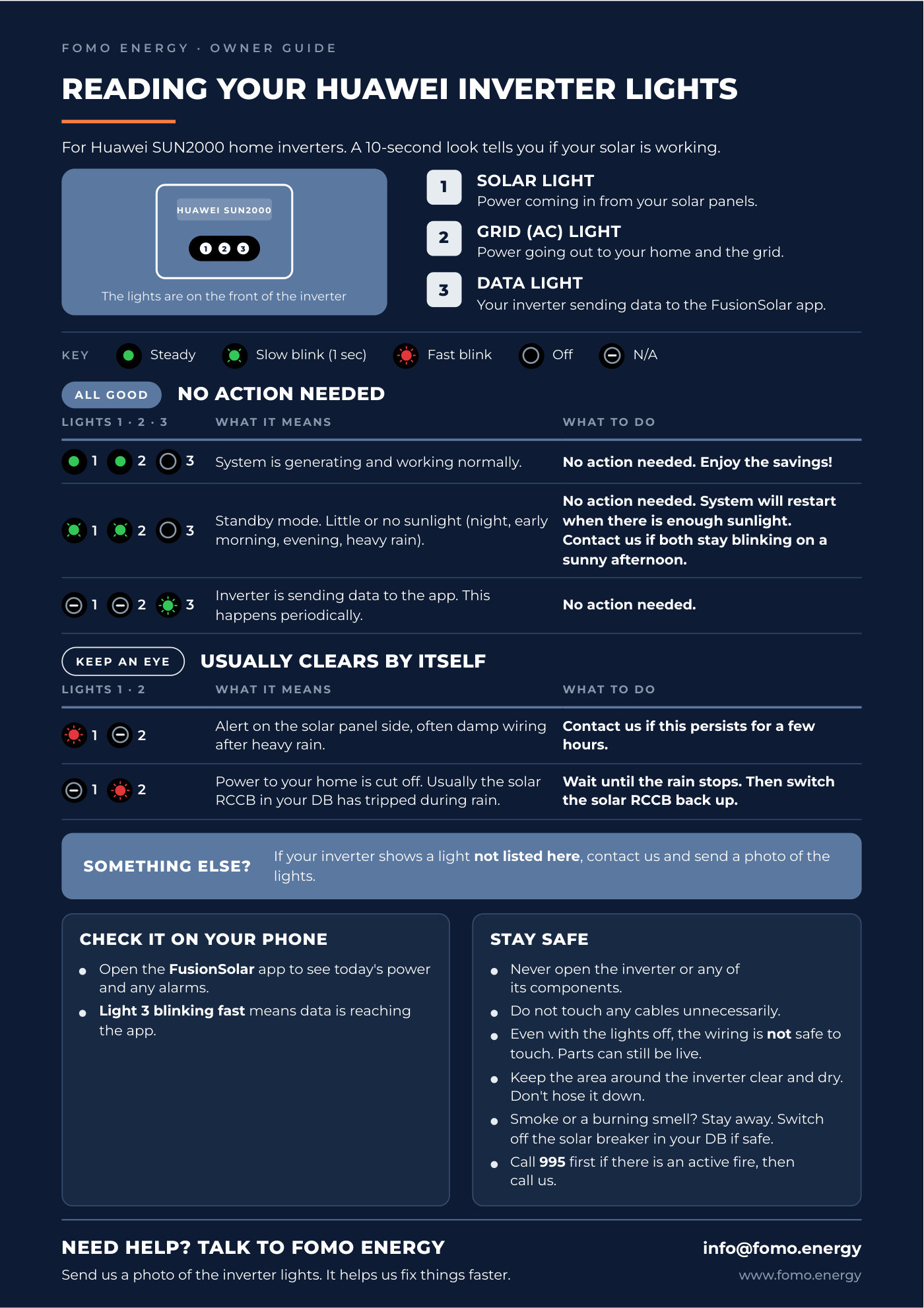
Reading your Huawei inverter lights
For Huawei SUN2000 home inverters. Three small lights sit on the front
of the unit.
HUAWEI SUN2000123
The lights are on the front of the inverter
1Solar light
Power coming in from your solar panels.
2Grid (AC) light
Power going out to your home and the grid.
3Data light
Your inverter sending data to the FusionSolar app.
Key Steady Slow blink (1 sec) Fast blink Off Not applicable
All good · no action needed
When everything is normal
Lights 1 · 2 · 3What it meansWhat to do
123
System is generating and working normally.
No action needed. Enjoy the savings!
123
Standby mode. Little or no sunlight — night, early morning, evening or heavy rain.
No action needed. The system restarts when there is enough sunlight. Contact us if both stay blinking on a sunny afternoon.
123
The inverter is sending data to the app. This happens periodically.
No action needed.
Keep an eye · usually clears by itself
When something needs watching
Lights 1 · 2What it meansWhat to do
12
Alert on the solar panel side, often damp wiring after heavy rain.
Contact us if this persists for a few hours.
12
Power to your home is cut off. Usually the solar RCCB in your DB has tripped during rain.
Wait until the rain stops, then switch the solar RCCB back up.
Check it on your phone
Open the FusionSolar app to see today's power and any
alarms. Light 3 blinking fast means data is reaching the app.
SungrowOne light
Reading your Sungrow inverter light
For Sungrow home inverters. One light tells you how your solar is
doing.
SUNGROW
The status light is on the front of the inverter
1One status light
Its colour, and whether it is steady or flashing, tells you how your inverter is
doing.
iBlue means all good
See any other colour? Send us a photo of the light.
Key Steady Flashing Off
All good · no action needed
What the light is telling you
LightWhat it meansWhat to do
Blue, steady
System is generating and working normally.
No action needed. Enjoy the savings!
Blue, flashing
Standby mode. Little or no sunlight — night, early morning, evening or heavy rain.
No action needed. The system restarts when there is enough sunlight. Contact us if it stays flashing on a sunny afternoon.
Off at night
No sunlight, so the inverter sleeps.
No action needed. The system restarts in the morning.
Quick check
Look at the light around midday on a sunny day. Steady blue
means you are making power. Anything else at that time is worth a closer look.
Check it on your phone
Open the iSolarCloud app for today's power, total
savings and any alarms. If the app says offline but the light is blue, your panels are
still working — check your home Wi-Fi. A fault shows as an error code; screenshot it
and send it to us.
Something else?
A light not listed here
If your inverter shows a light pattern that is not on this page, contact us and send a photo of the
lights. That is the fastest way for our team to tell what is going on.
Stay safe
Before you go near it
Never open the inverter or any of its components.
Do not touch any cables unnecessarily.
Even with the lights off, the wiring is not safe to touch.
Parts can still be live.
Keep the area around the inverter clear and dry. Do not hose it down.
Smoke or a burning smell? Stay away. Switch off the solar breaker in your DB if it is safe to
do so.
Call 995 first if there is an active fire, then call us.
Download
The printable owner
guide
Both brands on two pages. Print it and keep it near your DB box, or save it to your phone.
Prepared by the FOMO Energy Solar O&M team.